How to Self-Tape on an iPhone in 2026
You do not need a $3,000 camera to book a role. Your iPhone is more than enough — if you know the exact setup casting directors respond to.
By Sal Framondi
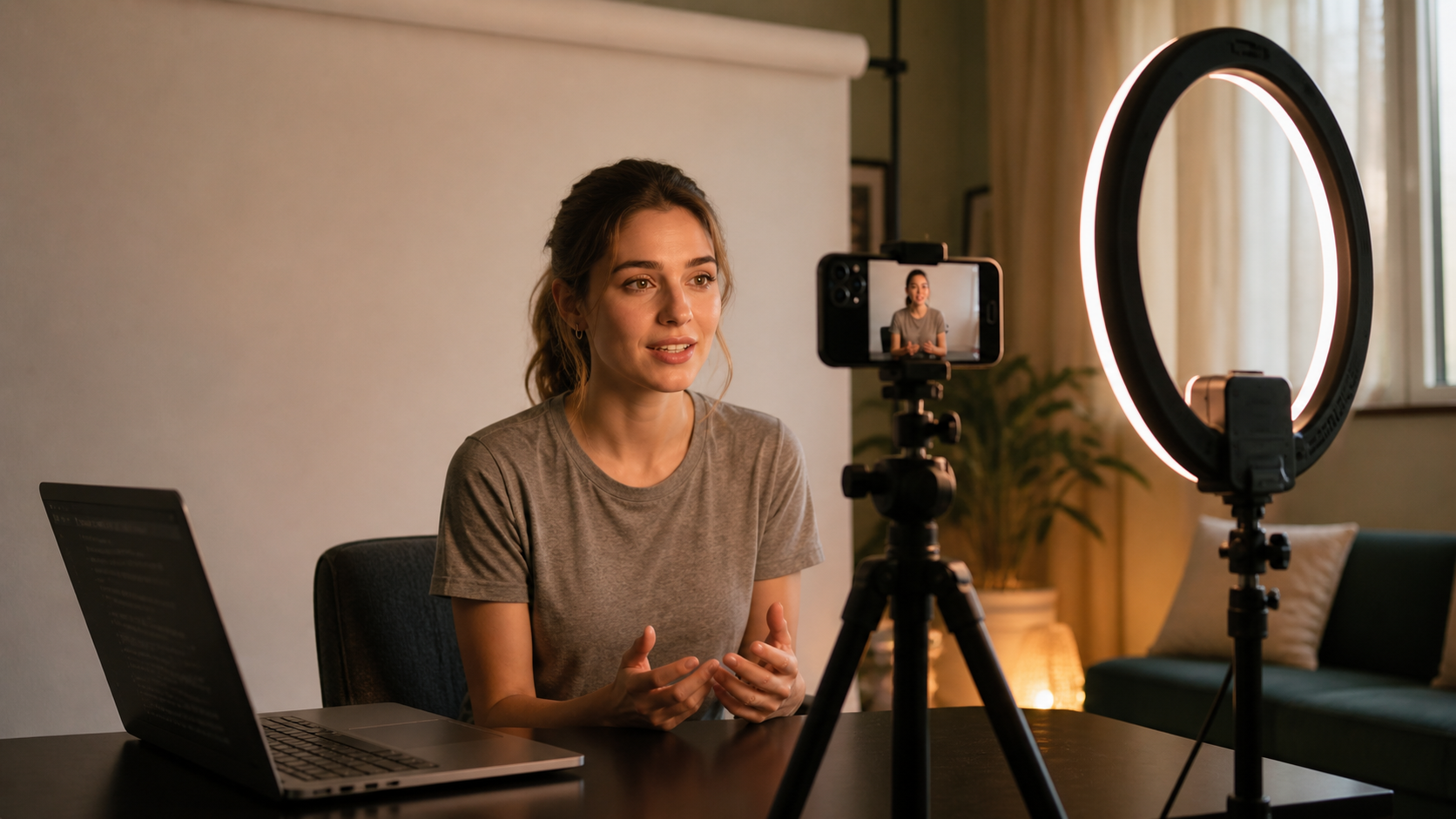
The problem is not your phone. The problem is what you do not know about using it. Poor framing, bad audio, wrong lighting, no teleprompter — these are the mistakes that get your tape skipped in the first three seconds.
This guide gives you everything. The exact iPhone self-tape setup. The settings to change. The tools that make the difference. And the fastest way to go from sides to submission — the same day you get the call.
Why Your iPhone Is Good Enough
Modern iPhones shoot in 4K. Casting directors watch your tape on a laptop or phone screen. The gap between an iPhone and a DSLR is invisible at that viewing size.
What casting directors actually care about: Can they hear you clearly? Is your face well-lit? Are you framed correctly? Does your performance feel alive?
None of those questions have anything to do with your camera model.
The iPhone Self-Tape Setup: Step by Step
Step 1 — Lock Your Settings
● Open your camera app and set it to video mode
● Go to Settings → Camera → Record Video → set to 1080p at 30fps
● Turn off digital zoom — never pinch to zoom during a self-tape
● Enable the grid lines to help with framing
● Lock your exposure before you record — tap and hold your face on screen
Step 2 — Frame Yourself Correctly
● Mount your phone at eye level on a tripod — never hold it
● Frame as a medium close-up: top of head to mid-chest
● Leave one finger of space above your head — no more
● Shoot horizontal — 16:9 — for all theatrical and TV auditions
● Keep your eyes at the upper third of the frame
Step 3 — Fix Your Lighting
● Face a window or a ring light — never have light behind you
● Use a ring light at arm's length directly in front of your face
● Set your ring light to 5600K daylight temperature for natural skin tones
● If using window light, film before 2pm when the light is even
Step 4 — Solve Your Audio
● The biggest mistake actors make: relying on the built-in iPhone mic
● Use a clip-on lavalier mic or a Rode VideoMicro on a small mount
● Record a test and listen back with headphones before your first real take
● Close windows, turn off fans and AC — silence your room first
Step 5 — Use a Teleprompter
This is the step most actors skip. And it is the step that kills the most performances.
When you are not fully off-book, your eyes go to the script. Casting directors see it immediately. The connection breaks. The tape gets skipped.
🎬 HowToSelfTape.com has a built-in teleprompter designed for actors. It scrolls your script at your pace so your eyes stay on the reader — not the page. Start your free 7-day trial and use it today.
The Most Common iPhone Self-Tape Mistakes
● Shooting vertical — always shoot horizontal for auditions
● Bad background — use a seamless paper backdrop or a clean wall
● Echo in the room — hang blankets or record in a closet if needed
● Wrong eye line — never look directly into the camera lens
● Starting without a test take — always record 30 seconds and review first
The Full iPhone Self-Tape Toolkit
Here is everything you need — most of it under $50:
● iPhone 12 or newer (what you already have)
● Basic tripod with phone mount — $15 to $25
● Ring light with stand — $30 to $60
● Clip-on lavalier microphone — $20 to $40
● Seamless paper backdrop roll and stand — $40 to $80
● HowToSelfTape.com — teleprompter, script analyzer, reader, and feedback in one place
From Sides to Submission — The Same Day
You get the email at 9am. Sides due by 5pm. Eight hours.
With the right iPhone setup and the right system, that is more than enough time to deliver your best work.
HowToSelfTape.com walks you through every step — script analysis, teleprompter, reader, and submission — so nothing falls through the cracks on a fast turnaround.
Start your free 7-day trial at HowToSelfTape.com — teleprompter, script analyzer, reader, and expert feedback all in one place. Your iPhone is ready. Now get the system that makes it work.